
Collecting evidence is easy; validating it actually demonstrates that the control worked is the slow part. Hailey now writes the evidence standard for every test and assesses submissions against it, so gaps are found at submission time instead of at review time.
Evidence collection runs on a rejection loop. The person who holds the evidence usually isn't the person who owns the control, so they send something plausible, it gets rejected, and the cycle repeats while the audit deadline moves closer. The quality bar lives in one person's head and gets applied inconsistently across hundreds of tests.
What's New?
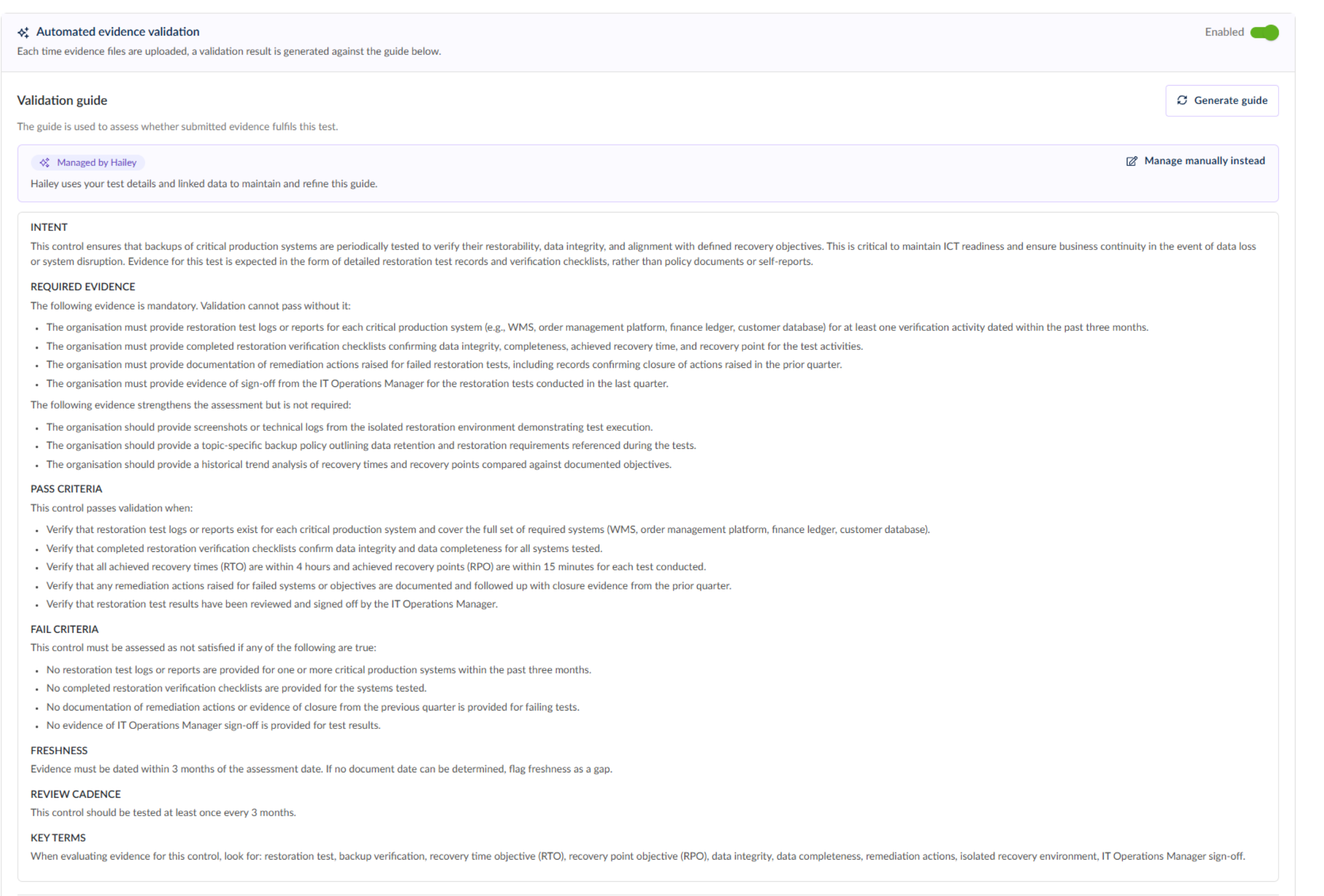
A validation guide is written for every test, automatically: When you create a test in the Tests register, Hailey writes a plain-language definition of what valid evidence looks like for that specific test, drawn from the test details, the linked control's description and the framework provisions to which the control maps. No per-test configuration, so coverage grows as your register does.
The guide is a structured standard, not a paragraph: It sets out the intent, the evidence that is mandatory, what strengthens an assessment, pass and fail criteria, how recently evidence must be dated, and the review cadence. The freshness window is derived from the test's own frequency.
You own the wording when you want it: Leave the guide at Managed by Hailey and it keeps improving as you link more data, or switch to Managed manually to write it yourself. Switch back with Ask Hailey to manage at any time.
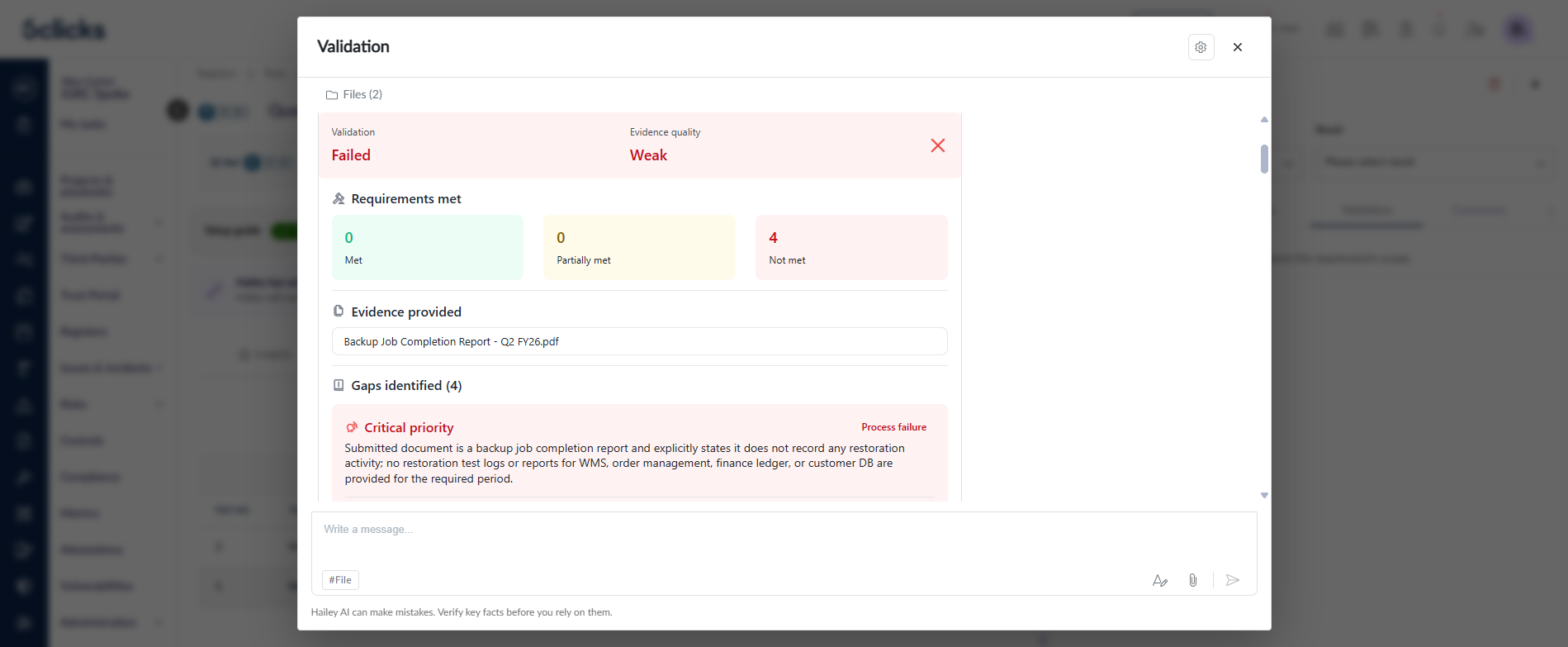
The findings are supported by the logic or evidence behind them: Each assessment returns a Validation result, an Evidence quality rating and a count of requirements met, partially met and not met. Validation highlights quote the passage in your document that satisfied each point.
Gaps come with a to-do list: Every gap carries a priority from critical to low and a type: a process failure, where the control did not operate correctly; a coverage gap, where it missed systems or periods it should have covered; or a documentation gap, where it happened but isn't evidenced. Each one includes suggested actions, so a failed validation tells you what to collect rather than just saying no.
Collection can be handed to someone else: Setting a scheduled test's log to Ready for evidence collection creates an evidence validation task automatically (unless one is already linked) named after the test, carrying its schedule and assigned to the people named on the test.
Submitters work in the task, not the test: Whoever collects the evidence uploads it on the task log and Hailey assesses it against the same validation guide. They see what is missing before the submission reaches a reviewer.
The decision stays with a person: Hailey never sets the outcome. The test owner reviews the assessment and sets the log's status and result.
How it works
Create a test in the Tests register and link it to the control it verifies. The guide is generated for you.
Review the guide on the test's Configuration tab. Edit it by switching to Managed manually, or sharpen the control description and regenerate.
Optionally attach supporting files as reference material for Hailey, e.g.,
.docx,.xlsx,.pdf,.md,.txt,.png,.jpg,.jpeg.Set a test log to Ready for evidence collection. This snapshots the guide against that log, so later edits never change the criteria a completed log was judged against.
Add evidence on the log's Evidence tab. Validation starts automatically.
Read the result on the Validation tab, then set the log's status and result yourself.
Where collection is delegated, the assignee works through the task log instead: they move it to In Progress, upload evidence on its Evidence tab, review the assessment on its Validation tab, and set it to Completed when done.
Worth knowing
Automated evidence validation is on by default for tests and can be turned off per test.
Hailey needs the test linked to a control that has a description. The guide is built from that description so a vague control produces a vague guide.
A guide is generated automatically when a test is created and can be regenerated on demand from the test.
Administrators can set a reference assurance scheme in register settings: ISO/IEC TS 27008 is used by default, or you can set it to ISO 27001, SOC 2, PCI-DSS, NIST CSF or IRAP. This sets the evidence-quality lens Hailey applies.
Requires the Hailey for evidence validation feature for your team.
Open any test in the Tests register to see the validation guide Hailey has already written for it.
Learn more: Hailey evidence validation